

Your Google reviews, measured.
See how well every location answers its customers, understand what the silence is costing you, and know exactly how many five-star reviews it takes to reach the next star.
- Every location in one view
- Printable PDF report
- Built on your real Google data
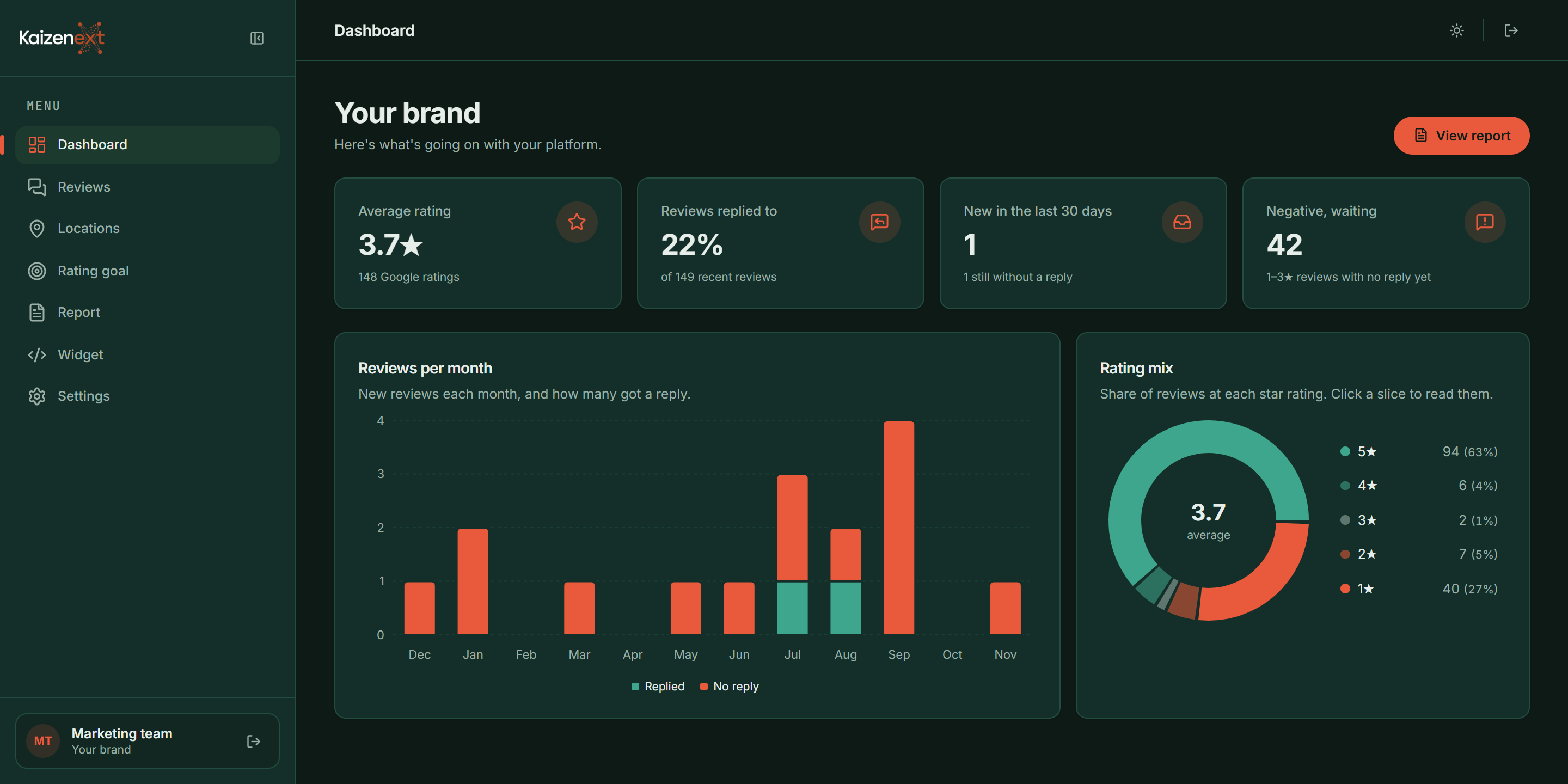
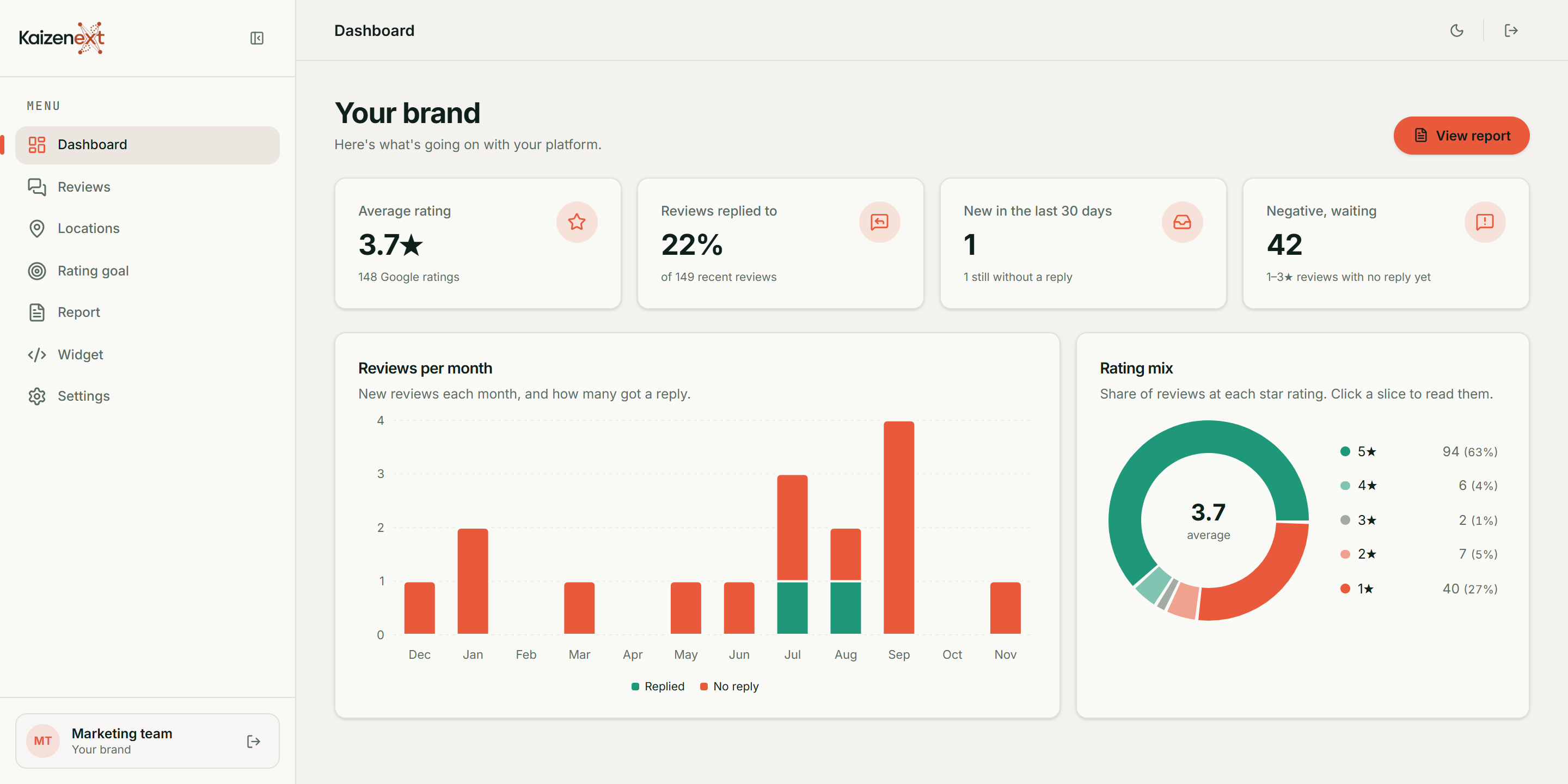
From a real audit of a national brand with four locations (name withheld, Nov 2026)
- Google ratings measured
- 0Google ratings measured
- locations compared side by side
- 0locations compared side by side
- unhappy customers found still waiting
- 0unhappy customers found still waiting
- five-star reviews to the next star
- 0five-star reviews to the next star
Reviews are public. So is the silence.
Customers read your replies as closely as your rating. Yet most businesses can't easily tell which locations answer, who is still waiting, or what it would take to improve.
Guesswork and spreadsheets
- Checking Google Maps one listing at a time
- A brand average that hides the branch nobody answers
- Unhappy customers waiting weeks, or forever, for a reply
- No idea how many good reviews it takes to move the rating
One honest view, and a plan
- Every location and every review on one screen
- Branches ranked side by side by reply rate and rating
- Negative reviews without a reply flagged, with how long they've waited
- A clear target: the exact number of five-star reviews to your next star
Know who is waiting and for how long, location by location.
Reply rates side by side make it obvious who needs help.
Turn the next rating goal into a number of reviews to win.
Everything you need to see it, understand it and act on it.
One portal for your whole brand. Set up by Kaizenext, ready the day you sign in.
Brand dashboard
Average rating, reply rate, new reviews and negative reviews still waiting.
Know where you stand in seconds.
Location comparison
Every branch side by side by rating, review count and reply rate.
Spot the location that needs help.
Waiting reviews
Negative reviews without a reply, with how many days each has waited.
Answer the customers who matter most.
Rating goal
How many new five-star reviews it takes to reach 4.0, 4.2 or 4.5.
Give the team a number to aim for.
Printable report
A clean PDF of your numbers, charts and findings in one click.
Share progress with owners and managers.
Competitor benchmark
Your rating and review count next to nearby competitors.
See how you compare locally.
- Full access
Alerts and auto-updates
Reviews refreshed daily or weekly, with instant or weekly email alerts.
Hear about new reviews without logging in.
- Add-on
Reply drafts
A suggested reply for each review that you edit and approve.
Reply faster, in your own voice.
- Add-on
Website review widget
Show your best real Google reviews on your own website.
Turn good reviews into trust on your site.
A closer look at the portal.
Scroll through the main screens of the client portal, shown here with the example audit.
- Your whole brand at a glance. The numbers that matter, for every location, the moment you sign in. Rating, reply rate and waiting reviews. Reply rate for each location. New reviews in the last 30 and 90 days.
- Every review, and who is still waiting. New and unanswered reviews flagged, with how many days each has waited. Filter by location, stars and reply status. Days waiting on every unanswered review. Suggested replies with the Reply drafts add-on.
- Patterns you can act on. Plain-language findings and charts that explain what is going on. Reply rate by star rating. What stands out, in plain words. Print or save the full report as a PDF.
- Branches side by side. See which locations do the work, and compare with competitors nearby. Rating, reviews and reply rate per branch. Unhappy customers waiting at each one. Competitor benchmark.
Up and running, done for you.
No software to install and no Google account access needed. We do the setup.
- 1
Request your audit
Tell us your business name and roughly how many locations you have.
Takes a minute.
- 2
We map and measure
Kaizenext links each of your Google locations and analyses every review.
Nothing to install or connect.
- 3
See your results
Sign in to your own portal: dashboard, locations, rating goal and report.
A clear picture, and a plan.
Less checking. More answering.
Review Performance turns a scattered, manual job into a short weekly habit with a clear goal.
Save time
One screen replaces checking every Google listing by hand, and alerts bring new reviews to you.
No extra tools to run
No spreadsheets to keep up to date and nothing to install. Kaizenext handles the setup.
A team that knows what to do
Managers see which reviews are waiting at their location, and team logins keep everyone on the same page.
Protect your rating
Answering unhappy customers shows future customers that someone listens before they choose you.
Stay ahead locally
Track your rating and review count against nearby competitors, not just your own history.
Built for businesses with more than one front door.
Wherever customers review you on Google across several locations, Review Performance shows where to act.
Multi-location brands
Compare every branch on one screen and see which ones leave customers waiting.
National retailers and service brands
Franchise networks
Give head office the brand view and each franchisee the numbers for their own site.
Franchise groups and dealer networks
Trades and home services
Warranty and service complaints are often the reviews left unanswered. Find them first.
Installers, repairers and manufacturers
Clinics and practices
Patients choose on reviews. Keep every location's rating and replies in check.
Dental, physio and medical groups
Hospitality
High review volumes across venues, with a clear goal for the next star at each one.
Hotels, restaurants and venues
Not sure it fits?
Tell us about your business and we'll show you what an audit of your own locations looks like.
Works with where your reviews already live.
No accounts to connect. Review Performance reads public data and delivers results where you already work.
Google Maps reviews
Ratings and reviews from each of your public Google listings, the source of every number.
SerpApi and Outscraper
Trusted review-data services that collect your public Google reviews for analysis.
Claude by AnthropicAdd-on
Writes the suggested replies in the Reply drafts add-on. You approve every word.
Email
Instant or weekly alerts and the monthly report, sent from your own address.
Your websiteAdd-on
A copy-and-paste widget shows your best real Google reviews on any site.
PDF
Print or save the full report to share with owners, managers and boards.
A national brand, four locations, and 42 customers waiting.
A real audit run with Review Performance in Nov 2026. The brand isn't named here, but every number below is theirs.
A healthy-looking 3.7★ hid an uneven story.
Across 148 Google ratings, 63% were five-star, but 27% were one-star, and only 22% of reviews had any reply at all.
3 of 4 locations had never replied.
42 negative reviews were still waiting, 33 of 43 written complaints were about service, support or warranty, and 70 five-star reviews never got a thank-you.
41 five-star reviews to reach 4.0★.
A clear plan: answer the waiting reviews location by location, thank happy customers, and track the climb to the next star in the portal.
Location by location
Replied = share of reviews with a reply| Location | Rating | Reviews | Replied | Negative, waiting |
|---|---|---|---|---|
| Pyrmont NSW | 3.5 | 52 | 0% | 20 |
| Port Melbourne VIC | 3.9 | 48 | 69% | 7 |
| Subiaco WA | 3.8 | 31 | 0% | 9 |
| Bowen Hills QLD | 3.8 | 17 | 0% | 6 |
How far is the next star?
Starting from the case-study brand's 3.73★ across 148 ratings, drag the slider to see what new five-star reviews do. Your portal runs the same maths on your own numbers.
Start with an audit. Grow when you're ready.
Every plan is set up for you by Kaizenext. Pricing depends on your number of locations and add-ons, so we quote it for you.
Audit
See where you stand, set up for you.
- Dashboard for your Google locations, set up by Kaizenext
- Location comparison and reply tracking
- Rating goal: reviews needed for the next star
- Printable PDF report
Full access
Stay on top of every review, every week.
- Everything in Audit
- Automatic daily or weekly review updates
- Instant or weekly email alerts for new reviews
- Monthly report by email
- Add your own locations and competitors
- Team logins: managers and view-only
- Monthly allowance of searches and review fetches
Multi-brand
For groups with many brands or sites.
- Everything in Full access
- Allowance sized to your locations
- Set up and supported by your Kaizenext contact
No self sign-up or card needed. Start with an audit of your own locations and decide from there.
Your data, handled with care.
Built so the risky things can't happen: no posting on your behalf, no access to your Google account, and no passwords stored as text.
Read-only by design
The portal only reads reviews that are already public. It can't change your Google listing or post on your behalf.
Nothing posted without you
Reply drafts are suggestions. A person edits and approves every reply before it's used.
Strong password storage
Passwords are never stored as text. They're hashed with PBKDF2-SHA256 at 600,000 iterations.
Protection against guessing
Sign-ins are throttled after repeated failures, per account and per address.
Encrypted secrets
API keys saved in settings are encrypted at rest, and sessions use signed tokens.
Roles and access control
Managers and view-only users, with preview logins that expire automatically.
Audit trail
Team sign-ins and changes are recorded in an audit log.
No account access needed
The portal works from public review data. You never share your Google login or payment details with it.
Questions, answered.
What does Review Performance do?
It reads the public Google reviews for every one of your locations and shows how well each one is answered: your rating, reply rate, negative reviews still waiting, and how many new five-star reviews it takes to reach your next rating goal. You can print it all as a PDF report.
Where does the data come from?
From your public Google Maps listings. Ratings and reviews are collected through the review-data services SerpApi and Outscraper, then measured in your dashboard.
Do I need to give you access to my Google Business account?
No. The dashboard only reads reviews that are already public. It cannot change your listing or post anything on Google.
How do I get an account?
Accounts are set up by Kaizenext rather than by self sign-up. Request an audit and we'll map your locations and send you a login for your own portal.
Can my team use it too?
Yes, with Full access. You can add team logins as managers, who can change settings, or as view-only users.
What does it cost?
Pricing depends on how many locations you have and which add-ons you want. Tell us about your business through the audit form and we'll come back with a quote.
Will it reply to reviews for me?
No reply is ever posted automatically. With the Reply drafts add-on you get a suggested reply for each review, which you edit and approve before using it.
How is my information protected?
Passwords are hashed, sign-ins are protected against repeated guessing, saved API keys are encrypted, and team actions are logged. See the Security section above for details.
Can I change or cancel my plan?
Yes. Your plan is arranged with your Kaizenext contact. Ask them and they will change or end your access.
How do I get help?
Your Kaizenext contact is your first stop. If you don't have one yet, send a request through the audit form and the team will get back to you.
Still have a question?
Let's make every five-star review count.
See how your locations answer their reviews, and exactly what it takes to reach your next star.
Set up for you. Read-only. Nothing posted without your OK.